
Claude Code Architecture Analysis
Claude Code Exposed: Anatomy of an Agentic AI Through an npm Source Map Leak
Contents
Between what Anthropic calls "open source" and what is actually open, there was a gap of 4,600 files.
TL;DR
- An npm source map mishap exposed Claude Code's proprietary core engine — all 4,600+ files of it
- The official "open source" release was just a plugin shell (279 files) — the core engine was commercially closed
- Inside lies a sophisticated production architecture: 8-layer security, 4-tier message compaction, cost-aware error recovery, and more
- Unreleased feature flags reveal the roadmap: voice mode, multi-agent Coordinator, proactive Kairos mode
- This is a rare opportunity to examine the real-world architecture of an agentic AI system
1. What Happened
On March 31, 2026, security researcher Chaofan Shou posted a few screenshots on X. The entire internal source code of Anthropic's Claude Code was sitting right there inside the npm package. Source map (.map) files are debugging artifacts that map minified/bundled code back to the original source — they should always be stripped from production builds, but these were left intact.
Reddit r/LocalLLaMA exploded, and the community began dissecting the entire codebase within hours.
This was not an intentional hack. Nor was it a sophisticated social engineering attack. Someone simply forgot to exclude .map files from the production package in the build pipeline — a straightforward build configuration mistake. But inside those .map files lay the entire brain of Claude Code: internal prompt structures, agent orchestration logic, tool invocation patterns. It was a moment that simultaneously revealed how meticulously Anthropic had designed Claude Code — and how carelessly they had shipped it. An unintended gift to both competitors and security researchers alike.
One thing worth clarifying: Anthropic has marketed Claude Code as "open source." There is an official GitHub repository that anyone can browse. But what is actually there?
The plugin system. Hook examples. Configuration file templates. Eleven example plugins.
If this were a restaurant, it would be like publishing the menu and table settings and declaring "our kitchen is open." The actual recipes, cooking techniques, and secret sauces were all hidden behind closed doors. What the npm source map revealed was the entire kitchen — over 4,600 source files across 55+ directories, written in TypeScript/React. The license is not Apache 2.0 but Anthropic Commercial Terms of Service. A far cry from true open source.
This post sets aside the legal and ethical debates. Instead, it digs deep into the technical architecture revealed by the leaked code. Frankly, it is quite impressive — except for the part where they accidentally leaked it.
2. Overall Architecture: Much Bigger Than You Think
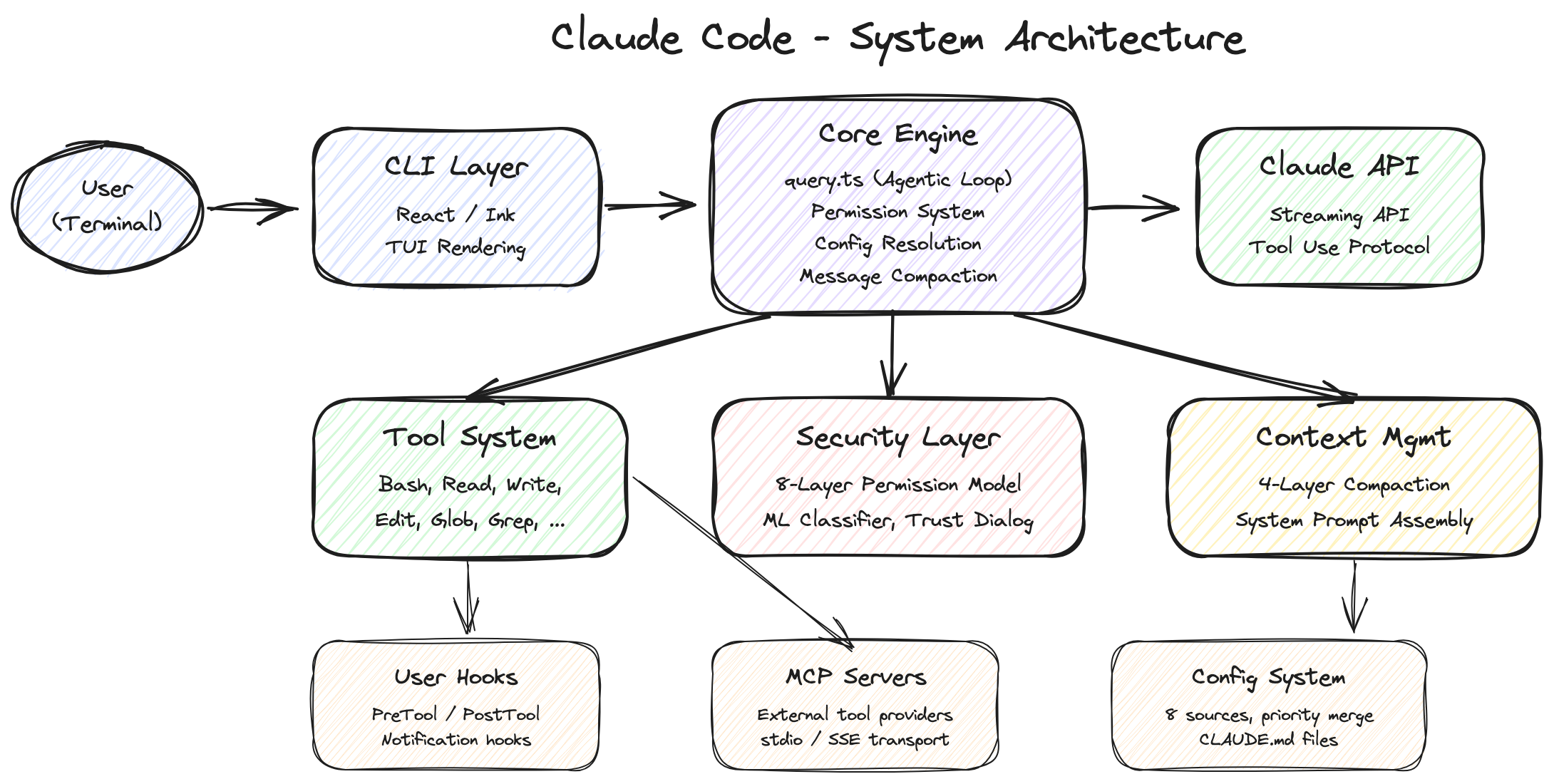
When you first encounter Claude Code, it is easy to think: "Isn't this just an API wrapper?" You talk to Claude in the terminal, Claude fixes your code, done. Looks simple.
Open the leaked code and that notion shatters.
Tech Stack
| Layer | Technology | Why This Choice |
|---|---|---|
| Runtime | Bun | Faster startup than Node.js with native TypeScript support. The feature() bundling API enables build-time dead code elimination (detailed in Section 6.1) |
| Language | TypeScript (strict mode) | Type safety is not optional in a 4,600+ file codebase |
| UI | React 18 + Ink | Renders React components in the terminal. Complex UI elements like permission dialogs, progress bars, and multi-panel layouts justify this choice |
| API Client | @anthropic-ai/sdk |
Official Anthropic SDK |
| MCP Client | @modelcontextprotocol/sdk |
An open protocol for LLMs to communicate with external tools and data sources in a standardized way (Model Context Protocol) |
| Feature Flags | GrowthBook | Server-side feature control and A/B testing — from security kill switches to unreleased feature gates (Sections 6.2, 7) |
| Bundler | Bun bundler | Based on the return value of the feature() function, unused code branches are completely eliminated from the build, separating internal and external builds |
Using React for a terminal app might seem like overkill. But when you look at the code — permission dialogs (PermissionDialog.tsx), Worker badges (WorkerBadge), multi-panel layouts, real-time streaming UI — these complex interactions make the choice understandable. It is a terminal, but far from simple text output. The UI is remarkably rich.
Official Open Source vs. Leaked Code: The Gap in Numbers
Official Repo (anthropics/claude-code) |
Leaked Code | |
|---|---|---|
| File Count | ~279 (scripts/configs) | 4,600+ (full-stack engine) |
| Core Engine | Not included | Included |
| Tool Implementations | Not included | Fully included (Bash, Read, Write, Edit…) |
| Agentic Loop | Not included | Included (query.ts, 1,729 lines) |
| Permission System | Not included | Included (permissions.ts, 52K) |
| API Communication | Not included | Included (streaming, caching, fallback) |
| Bridge/Remote | Not included | Included (33+ files) |
| MCP Client | Not included | Included (client.ts, 119K) |
| License | Anthropic Commercial ToS | Proprietary commercial code |
279 vs 4,600. Time to rethink the definition of "open source."
3. The Agentic Loop: Opening the Heart
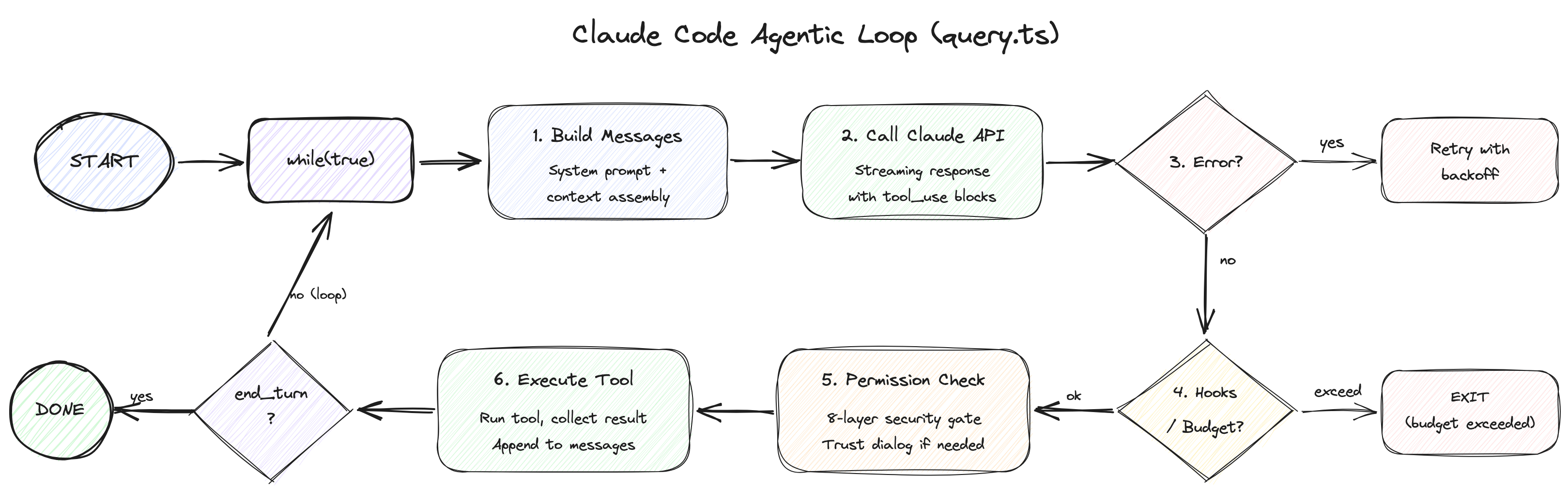
The heart of Claude Code is query.ts — a 1,729-line while(true) loop. This "agentic loop" governs the entire cycle: receiving user input, executing tools, and feeding results back to Claude.
3.1 Async Generator: An Elegant Design Choice
The first thing that catches the eye is the function signature.
export async function* query(
  params: QueryParams,
): AsyncGenerator<
  | StreamEvent
  | RequestStartEvent
  | Message
  | TombstoneMessage
  | ToolUseSummaryMessage,
  Terminal  // Return value: termination reason
>
async function* — an async generator. Unlike a normal function that can only return a single value, a generator function (denoted by function*) can emit multiple values via yield. Adding async to that means it can await asynchronous operations (API calls, file reads, etc.) while pushing out intermediate results one at a time.
Here is why this is a clever design choice. There are two traditional approaches for "emitting a stream of events." The EventEmitter pattern registers callbacks to event names, like emitter.on('data', callback) — Node.js streams are a prime example. The callback-based pattern passes separate functions for each concern: query(params, onEvent, onDone, onError). Both approaches scatter event flow, termination handling, and error handling across different channels. As complexity grows, bugs like "received events but missed the termination signal" or "forgot to register the error handler" become all too common.
An async generator unifies all three into a single function. On the consumer side, events arrive one by one via a for await...of loop. When the generator finishes, the termination reason (Terminal) comes from the return value. If an error occurs, throw inside the generator naturally propagates to the consumer's try-catch — no separate error channels or callback registration needed.
The result is that "streaming events, normal termination, and error propagation" are all cleanly expressed in a single function signature. It is a remarkably fitting pattern for the complex state machine that an agentic loop demands.
3.2 Immutable Parameters + Mutable State: The Continue Site Pattern
The loop separates two kinds of data.
Immutable parameters — things that do not change throughout the loop:
type QueryParams = {
  messages: Message[]
  systemPrompt: SystemPrompt
  canUseTool: CanUseToolFn       // Permission check callback
  toolUseContext: ToolUseContext   // Tool execution context
  taskBudget?: { total: number }  // API task_budget (beta)
  maxTurns?: number               // Maximum turn limit
  fallbackModel?: string          // Fallback model
  querySource: QuerySource        // Query source (REPL, agent, etc.)
  // ...
}
Mutable state — things updated on every iteration:
type State = {
  messages: Message[]
  toolUseContext: ToolUseContext
  autoCompactTracking: AutoCompactTrackingState | undefined
  maxOutputTokensRecoveryCount: number
  hasAttemptedReactiveCompact: boolean
  maxOutputTokensOverride: number | undefined
  pendingToolUseSummary: Promise<ToolUseSummaryMessage | null> | undefined
  stopHookActive: boolean | undefined
  turnCount: number
  transition: Continue | undefined  // Continuation reason from previous iteration
}
The pattern to note here is the "Continue Site" — the term refers to points in the loop where state is updated and execution continues to the next iteration. The source code comments explain it directly:
// Continue sites write `state = { ... }` instead of 9 separate assignments.
Instead of modifying 9 individual fields one by one, the entire state object is reassigned at once.
state = {
  ...state,
  messages: newMessages,
  turnCount: nextTurnCount,
  transition: { reason: 'next_turn' }
}
This pattern has two advantages. First, state transitions are atomic — meaning "either everything succeeds or nothing changes." If you modified 9 fields one line at a time and an error occurred on the 3rd line, you would end up in a half-updated state where 2 fields changed and the other 7 did not. Reassigning the entire object at once makes such intermediate states structurally impossible. Second, the transition field records why execution continued to the next turn. Was it 'next_turn'? Error recovery? A fallback model switch? This is explicit, so tests can verify that recovery paths worked correctly without inspecting message contents.
React's setState philosophy has permeated all the way into the backend loop — a glimpse into the Anthropic engineers' love for React.
This pattern matters because, in an agentic loop, state management bugs translate directly into user costs. Corrupted state leads to unnecessary API calls, and those calls cost tokens. Competitors like Cursor or Windsurf presumably implement similar agentic loops, but whether they achieve this level of state management rigor is unknown — their code is not public.
3.3 The 6-Stage Per-Turn Pipeline: A Detailed Walkthrough
Each turn goes through the following 6 stages. We will examine them alongside the actual line numbers in the source code.
Stage 1: Pre-Request Compaction (lines 365-548)
Conversation history is cleaned up before calling the API. Five compaction mechanisms are applied cheapest-first, in sequence. Each is covered in depth in Section 4, but here is a brief overview:
- Tool Result Budget — Caps oversized tool results. File reads or search results can span thousands of lines; this trims them to budget.
- Snip Compact — Drops old messages wholesale. The cheapest but most aggressive.
- Microcompact — Selectively clears individual tool results, choosing targets with prompt-cache awareness.
- Context Collapse — Reduces message blocks in stages. Creates a collapsed view without touching the originals.
- Auto-Compact — Summarizes the entire conversation via an LLM call. The most expensive but most effective.
In code:
// 1. Apply Tool Result Budget (lines 369-394)
messagesForQuery = await applyToolResultBudget(
  messagesForQuery,
  toolUseContext.contentReplacementState,
  // Only save replacement records for agent/REPL sources (for resume)
  persistReplacements ? records => void recordContentReplacement(...) : undefined,
)

// 2. Snip Compact — the cheapest option (lines 401-410)
if (feature('HISTORY_SNIP')) {
  const snipResult = snipModule!.snipCompactIfNeeded(messagesForQuery)
  messagesForQuery = snipResult.messages
  snipTokensFreed = snipResult.tokensFreed
}

// 3. Microcompact — cache-aware tool result clearing (lines 413-426)
const microcompactResult = await deps.microcompact(messagesForQuery, toolUseContext, querySource)
messagesForQuery = microcompactResult.messages

// 4. Context Collapse — staged reduction (lines 440-447)
if (feature('CONTEXT_COLLAPSE') && contextCollapse) {
  const collapseResult = await contextCollapse.applyCollapsesIfNeeded(...)
  messagesForQuery = collapseResult.messages
}

// 5. Auto-Compact — full summarization when threshold exceeded (lines 453-543)
const { compactionResult, consecutiveFailures } = await deps.autocompact(...)
The ordering matters. The reason Context Collapse comes before Auto-Compact is explained directly in the source code comments:
// Runs BEFORE autocompact so that if collapse gets us under the
// autocompact threshold, autocompact is a no-op and we keep granular
// context instead of a single summary.
If Collapse reduces enough, Auto-Compact (an expensive API call) does not fire. The strategy is to preserve fine-grained context as much as possible while saving costs.
There is a subtle problem here. When compaction drops older messages, the server can no longer know how many tokens were consumed in those messages. So the client must calculate "total tokens spent so far is X, remaining budget is Y" itself and report it to the server. Because the server and client are looking at history from different points in time, this synchronization problem is a tricky issue commonly encountered in agentic systems.
Stage 2: API Call & Streaming (lines 659-863)
for await (const message of deps.callModel(
  fullSystemPrompt,
  prependUserContext(messagesForQuery, userContext),
  toolUseContext,
  { taskBudget, taskBudgetRemaining, maxOutputTokensOverride, skipCacheWrite },
)) {
  // Process streaming events
}
The key here is the StreamingToolExecutor. Normally, you would expect a sequential flow: "Claude finishes responding, then tools execute, then results return." But Claude Code runs tools in parallel while Claude is still generating its response. This means files are already being read while Claude is typing "Let me read that file." The reduction in perceived latency comes from tricks like this.
Of course, not all tools can run concurrently without consequences. Running two file-read tools simultaneously is harmless, but running a file-write tool and a file-read tool at the same time produces unpredictable results. The source code handles this problem with considerable sophistication:
// StreamingToolExecutor.ts
private canExecuteTool(isConcurrencySafe: boolean): boolean {
  const executingTools = this.tools.filter(t => t.status === 'executing')
  return (
    executingTools.length === 0 ||
    (isConcurrencySafe && executingTools.every(t => t.isConcurrencySafe))
  )
}
Every tool has an isConcurrencySafe flag. Read-only tools like FileReadTool, GlobTool, and GrepTool are true — they do not affect each other and can safely run in parallel. Tools that modify the filesystem or environment, like FileWriteTool or BashTool, are false — they must run alone. The condition above, stated in plain language: "allow execution only when no tools are currently running, or when both the currently running tools and the new tool are all concurrency-safe."
And when one tool errors, sibling tools running alongside it are cancelled with sibling_error.
type AbortReason =
  | 'sibling_error'       // Sibling tool error → cancel me too
  | 'user_interrupted'     // User pressed Ctrl+C / ESC
  | 'streaming_fallback'   // Discarded due to model fallback
Model fallback is also handled here. When the API call fails or the primary model cannot respond, it automatically switches to a pre-designated fallback model:
if (innerError instanceof FallbackTriggeredError && fallbackModel) {
  currentModel = fallbackModel
  attemptWithFallback = true
  // Create tombstones for orphaned messages
  yield* yieldMissingToolResultBlocks(assistantMessages, 'Model fallback triggered')
  // Reset StreamingToolExecutor and retry
}
The tombstone messages here deserve explanation. When the model switches, tool calls requested by the previous model are no longer valid. But the conversation history still records "a tool was called," and without a corresponding result, the history becomes inconsistent. A tombstone is a marker that fills this gap — borrowing the concept from databases where entries are marked as "deleted" — it leaves a record saying "this tool call was discarded due to model fallback," keeping the history internally consistent.
Stage 3: Error Recovery Cascade (lines 1062-1256)
This is the most architecturally impressive section. API calls can fail — the prompt may be too long (413 error, meaning "Prompt Too Long"), or the response may exceed the output token limit (max-output-tokens error). A simple system would just throw the error at the user and give up. Claude Code instead attempts recovery in order from lowest to highest cost.
Prompt-too-long (413 error) recovery — 3-stage cascade:
Stage 1: Context Collapse drain (cost: 0)
  └ Context Collapse normally pre-selects message blocks as reduction candidates (preview).
    When a 413 error hits, those pending candidates are immediately committed to shrink context.
    Since the candidates are already prepared, applying them requires no additional API calls.

Stage 2: Reactive Compact (cost: 1 API call)
  └ Summarizes the entire conversation. Strips images, summarizes, then retries.
  └ "strip retry" — if the summary itself is too large, removes media and tries once more.

Stage 3: Surface the error
  └ If all attempts fail, shows the error to the user.
Max-output-tokens recovery — also 3 stages:
Stage 1: Token cap escalation (cost: 0)
  └ Transparently increases from 8K → 64K (ESCALATED_MAX_TOKENS).
  └ Handled automatically with no meta-message. The user does not notice.

Stage 2: Resume message injection (cost: API re-call, up to 3 times)
  └ Injects a message: "Your previous response was truncated. Please continue from where you left off."
  └ Then calls the model again.
  └ Tracks maxOutputTokensRecoveryCount, attempting up to 3 times.

Stage 3: Recovery exhaustion
  └ If still unresolved after 3 attempts, completes with whatever results are available.
The design principle behind this cascade is clear: the first attempt is always free. The expensive operation of summarizing the entire conversation is a last resort. This is not simple "retry" logic — it is a recovery strategy with precise cost-effectiveness considerations.
Stage 4: Stop Hooks & Token Budget (lines 1267-1355)
Stop hooks execute user-defined validation logic. If you set up a hook saying "don't stop unless tests pass," the hook runs when Claude tries to finish. If it fails, the hook's error message is injected into the conversation and Claude tries again.
The token budget is even more interesting. It is not simply "stop when the budget runs out" — it also stops when there is no progress even with budget remaining:
function checkTokenBudget(tracker, budget, globalTurnTokens) {
  const pct = (turnTokens / budget) * 100
  const isDiminishing = (
    continuationCount >= 3 &&        // Continued 3+ times consecutively
    deltaSinceLastCheck < 500 &&     // Fewer than 500 tokens since last check
    lastDeltaTokens < 500            // Previous check also under 500 → "spinning wheels"
  )

  if (!isDiminishing && turnTokens < budget * 0.9) {  // Not spinning and under 90% budget
    return { action: 'continue', nudgeMessage: ... }   // Keep going
  }
  return { action: 'stop', completionEvent: { diminishingReturns, ... } }  // Stop
}
Diminishing returns detection is built in. If Claude continues 3 consecutive times but produces fewer than 500 tokens each time, the system decides "continuing further is pointless" and stops. It keeps going until 90% of the budget is consumed, but it will not spin its wheels.
Why this logic matters: the most dangerous thing in an agentic loop is an infinite loop. Claude repeatedly saying "let me try one more fix" while burning tokens with no progress. This diminishing returns detection automatically blocks those situations.
Stage 5: Tool Execution (lines 1363-1520)
Streaming mode (already started in Stage 2) and batch mode coexist. In Stage 2, the StreamingToolExecutor already began executing concurrency-safe tools in parallel during API response generation. Here, those results are collected and the remaining tools are executed sequentially.
// Streaming: collect results from concurrency-safe tools already executing since Stage 2
if (streamingToolExecutor) {
  toolResults = await streamingToolExecutor.getRemainingResults()
}

// Batch: remaining tools that were not streamed execute sequentially here
toolResults = await runTools(toolUseBlocks, toolUseContext, canUseTool)
While tools are running, the terminal spinner updates in real time. A Promise resolver called progressAvailableResolve sends a signal to UI consumers that "new progress is available," and the UI receives this signal to refresh the spinner text.
Stage 6: Post-Tool & Next Turn Transition (lines 1547-1727)
After tool execution completes, several "side tasks" are processed in preparation for the next turn. The most notable aspect here is the prefetch pattern. Back in Stage 1 (compaction), slow operations like "fetch skill list" and "load memory" were kicked off in advance. Here in Stage 6, those results are harvested. Since the network requests completed in the background during Stages 2 through 5, there is no waiting.
// 1. Consume skill discovery — harvest what was prefetched in Stage 1
if (pendingSkillPrefetch?.settledAt !== null) {
  const skillAttachments = await pendingSkillPrefetch.promise
}

// 2. Consume memory attachments — also harvest prefetched results from Stage 1
if (pendingMemoryPrefetch?.settledAt !== null) {
  const memoryAttachments = await pendingMemoryPrefetch.promise
}

// 3. Drain queued commands — slash commands, task notifications queued during tool execution
const queuedCommands = getCommandsByMaxPriority(...)

// 4. Refresh MCP server tools — external tool list may have changed
if (toolUseContext.options.refreshTools) {
  toolUseContext.options.tools = toolUseContext.options.refreshTools()
}
Then the state transitions:
// Continue Site: proceed to next turn
state = {
  messages: [...messagesForQuery, ...assistantMessages, ...toolResults],
  toolUseContext: toolUseContextWithQueryTracking,
  autoCompactTracking: tracking,
  turnCount: nextTurnCount,
  transition: { reason: 'next_turn' },
}
// Returns to top of while(true) loop
3.4 Termination Reasons: 9 Ways the Loop Ends
| Exit Reason | Meaning | Trigger Point |
|---|---|---|
completed |
Normal completion (response ended without tool calls) | line 1264, 1357 |
blocking_limit |
Hard token limit reached | line 646 |
aborted_streaming |
User interrupted during streaming (Ctrl+C) | line 1051 |
aborted_tools |
User interrupted during tool execution | line 1515 |
prompt_too_long |
Prompt exceeded limit even after recovery attempts | line 1175, 1182 |
image_error |
Image validation failure (size exceeded, etc.) | line 977, 1175 |
model_error |
Unexpected model error | line 996 |
hook_stopped |
Stop hook blocked continuation | line 1520 |
max_turns |
Maximum turn count exceeded (maxTurns parameter) |
line 1711 |
3.5 QueryEngine.ts: The Session-Level Supervisor
Everything we have examined so far in query.ts handles the cycle of "one user input, Claude responds, tools execute, Claude again." But who manages the entire session spanning multiple user inputs? That would be QueryEngine.ts (1,295 lines).
class QueryEngine {
  mutableMessages: Message[]       // Full conversation history
  permissionDenials: PermissionDenial[]  // Tool permission denial records
  totalUsage: Usage                // Cumulative token usage
  readFileState: FileStateCache    // File state cache (prevents duplicate reads)
  discoveredSkillNames: Set<string> // Discovered skills (reset per turn)
  loadedNestedMemoryPaths: Set<string> // Loaded memory paths (prevents duplicates)
}
The submitMessage() method receives user input, calls query(), and accumulates results into the session.
// Accumulate usage
this.totalUsage = accumulateUsage(this.totalUsage, currentMessageUsage)
An asymmetric strategy is applied to transcript recording:
// User messages: blocking save (essential for --resume restoration)
await recordTranscript(userMessage)

// Assistant messages: fire-and-forget (start the operation, don't wait for it to complete)
recordTranscript(assistantMessage)  // No await
Not all messages are saved with equal priority. User messages are required for --resume to pick up a session, so the loop waits until the write is confirmed on disk before proceeding (await). Assistant responses, on the other hand, are not strictly necessary for session restoration, so the save request is dispatched and the loop moves on immediately without waiting for completion (no await). Even if the write fails, the loop keeps running. This cuts disk I/O wait time roughly in half while still guaranteeing the data that truly cannot be lost is persisted.
4. Message Compaction: A Sophisticated War Against the Context Window
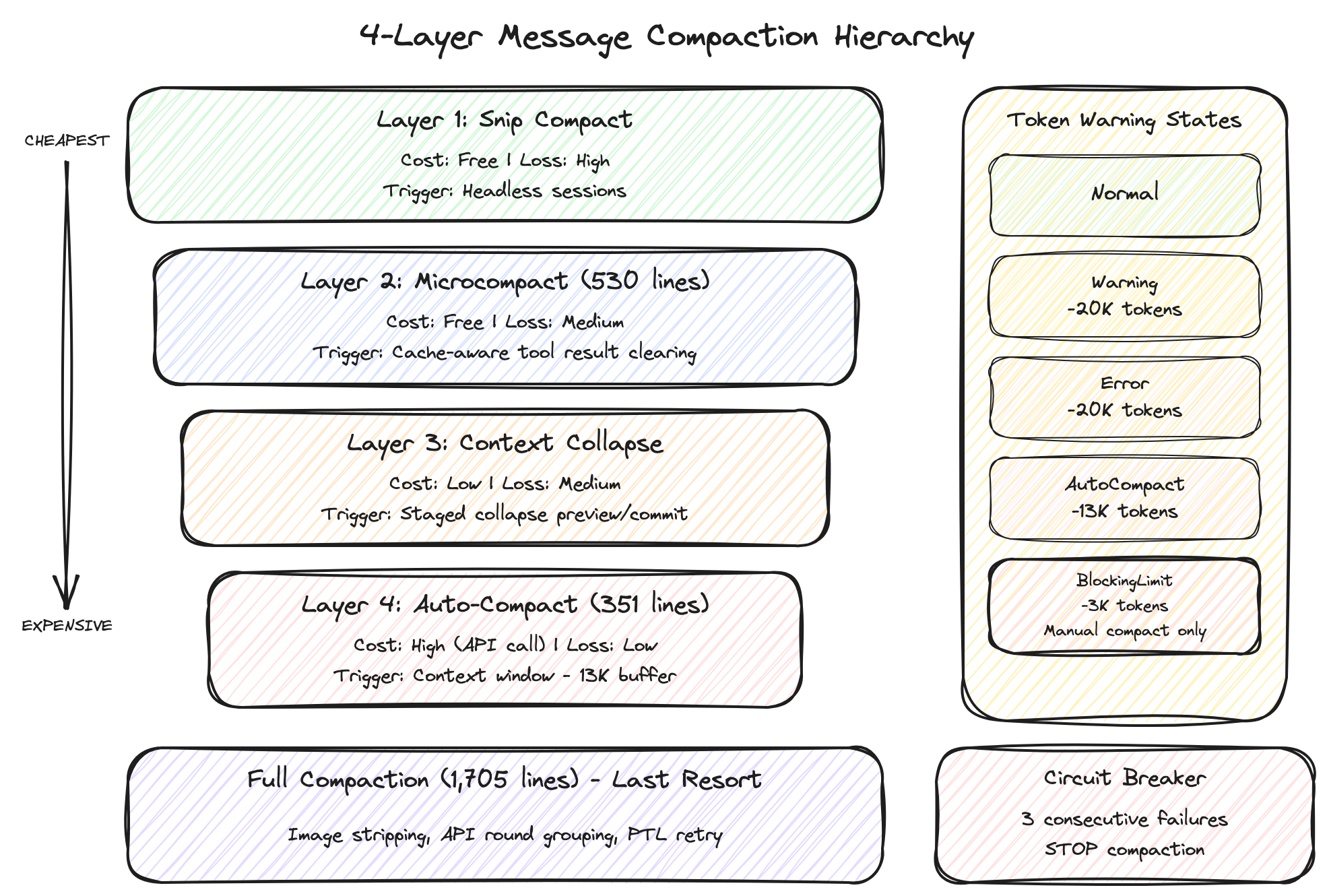
The greatest enemy of an agentic AI tool is the context window limit. There is an upper bound on the total text that can be sent to an LLM, and as conversations grow longer, earlier content gets truncated or the API returns a 413 (Prompt Too Long) error. Claude Code's compaction system addresses this with 4 layers, each with different costs and levels of information loss. The core principle: "always start with the cheapest option."
4.1 Snip Compact — Cheapest and Most Aggressive
Cost: Free (no API calls) Information loss: High
True to its name ("snip" as in cutting), it removes entire blocks of older messages and keeps only recent context. No summarization or analysis — it simply discards, so information loss is high, but cost is zero since no API calls are made. Gated behind the HISTORY_SNIP feature flag, primarily used in headless (UI-less, background) sessions. Since automated sessions are not directly viewed by users, aggressive snipping is acceptable.
const snipResult = snipModule!.snipCompactIfNeeded(messagesForQuery)
messagesForQuery = snipResult.messages
snipTokensFreed = snipResult.tokensFreed
Importantly, snipTokensFreed — the number of tokens Snip removed — is passed to the Auto-Compact stage. Why? Auto-Compact decides whether to trigger based on "has the current token count exceeded the threshold?" But the token count estimate (tokenCountWithEstimation) only counts currently remaining messages, so it has no way of knowing what Snip already removed. Without passing this information, "Snip already reduced enough, yet Auto-Compact fires unnecessarily" becomes a real scenario. The source comments explain this directly:
// snipTokensFreed is plumbed to autocompact so its threshold check reflects
// what snip removed; tokenCountWithEstimation alone can't see it
4.2 Microcompact (530 lines) — Selective Clearing That Respects the Cache
Cost: Free (no API calls) Information loss: Medium
The "micro" in the name reflects that it operates on individual tool results rather than the entire conversation — selectively clearing only specific tools' outputs. For example, file contents read by file_read ten turns ago (potentially hundreds of lines) are information Claude has already digested. Replacing the original with a short placeholder like "[Old tool result content cleared]" has little impact on subsequent conversation.
// Clearing targets: file_read, shell, grep, glob, web_search, web_fetch, file_edit, file_write
// Replaces results with "[Old tool result content cleared]"
// Images/documents: estimated at 2,000 tokens
// Text: rough token count estimation
But you cannot blindly clear any tool result. This is where the real core of this layer emerges — cache edit block pinning.
To understand this, you first need to know about prompt caching. When sending a prompt to the Anthropic API, if the beginning of the prompt (the prefix) is identical to the previous request, the server skips recomputation for that portion. In an agentic loop that must resend the system prompt plus the entire conversation history every turn, this caching dramatically reduces both cost and latency.
The problem is that when Microcompact clears a tool result in the middle of the conversation, the prompt content changes from that point forward, and all cache entries after that point are invalidated. If you clear one old grep result near the beginning of the conversation and it wipes out tens of thousands of tokens worth of cache downstream, the "optimization" backfires.
Cache edit block pinning solves this. "Pinning" means keeping tool results that fall within the cached prefix region pinned in place rather than clearing them. Specifically:
- Track which tool results currently fall within the cached prefix range
- Exclude results within the cache range from clearing candidates (pinning)
- Safely clear only results outside the cache range
- Record pinned results in
pendingCacheEditsas "candidates to clear later" - On the next turn, when the cache range shifts, clear candidates that are no longer within the cache
const pendingCacheEdits = feature('CACHED_MICROCOMPACT')
  ? microcompactResult.compactionInfo?.pendingCacheEdits
  : undefined
The strategy boils down to "clearing now would break the cache, so defer until it is safe." In prompt caching, a single cache miss means recomputation of tens of thousands of tokens, so sending a slightly larger prompt may actually be cheaper than breaking the cache with premature clearing. Reducing context while maintaining cache hit rates are conflicting goals, and this pinning mechanism strikes the balance.
4.3 Context Collapse — Staged Reduction
Cost: Low Information loss: Medium
This layer uses a concept reminiscent of Git's commit model: "staged collapse." Instead of compressing the entire conversation at once, it operates in two stages.
Preview stage: The system scans the conversation and identifies "this message block could be collapsed." For example, if there is a block from 10 turns ago where 5 files were read consecutively, it marks this as collapsible into a one-line summary: "Read 5 files and confirmed X." Nothing changes at this point.
Commit stage: The candidates selected during preview are actually collapsed. But the crucial design decision here is that original messages are never modified. Instead, the collapsed results (summaries) are stored in a separate collapse store, and when sending the prompt to the API, a projectView() function overlays the collapsed view on top of the originals.
The source comments explain this design directly:
// Nothing is yielded — the collapsed view is a read-time projection
// over the REPL's full history. Summary messages live in the collapse
// store, not the REPL array. This is what makes collapses persist
// across turns: projectView() replays the commit log on every entry.
This is called a read-time projection — the same concept as a database "view." The original table remains untouched, and a virtual table shows processed results each time you query. Here too, the original message array is never touched; the collapsed version is computed at the moment of sending to the API. Similar to how Git shows different branch snapshots without modifying the underlying files.
Why this level of complexity? Because of prompt caching. Directly modifying original messages would invalidate all cache entries from that point forward (the same problem described in Section 4.2). By preserving the originals, the cached prefix remains intact, so you get the benefits of collapse while maintaining cache hit rates.
4.4 Auto-Compact (351 lines) — The Last Resort
Cost: High (additional Claude API call) Information loss: Low (AI summarizes, so key information is preserved)
The three preceding layers (Snip, Microcompact, Context Collapse) all work by cutting, clearing, or collapsing views of existing messages. Auto-Compact is fundamentally different — it sends the entire conversation history to Claude and asks "please summarize the conversation so far." Since the AI understands the context and distills only the essentials, information loss is minimal, but the additional API call makes it the most expensive option.
The threshold logic that determines when to trigger is clear:
function getAutoCompactThreshold(model: string): number {
  const effectiveContextWindow = getEffectiveContextWindowSize(model)
  return effectiveContextWindow - 13_000  // 13K token buffer
}
It reserves 13K tokens of headroom from the context window. This buffer is where the system prompt, tool definitions, and the next turn's model response need to fit. When the remaining space fills up with conversation history, auto-compaction fires.
A circuit breaker pattern is applied here. Just as an electrical breaker cuts the circuit to protect equipment when overloaded, this software pattern stops retrying after detecting consecutive failures:
MAX_CONSECUTIVE_AUTOCOMPACT_FAILURES = 3
Why is this needed? When a conversation becomes extremely long, even the summarization request itself can exceed the context limit and fail. Without the circuit breaker, this leads to an infinite loop of "compact fails, retry, fails again, retry…" After 3 consecutive failures, the circuit breaker trips and gives up cleanly, handing control to other recovery paths (the error recovery cascade in Section 3.3).
4.5 Full Compaction (1,705 lines) — Auto-Compact's Engine Room
This is the preprocessing stage before Auto-Compact sends its "please summarize" request. Even the summarization prompt has a context limit, so unnecessary parts are trimmed first to increase the success rate of summarization.
- Image stripping: Replaces images and documents with
[image]/[document]placeholders. A single image can consume thousands of tokens; for the summarization model, knowing "an image was here" is sufficient. - API round grouping: In the Claude API,
tool_use(tool call request) andtool_result(execution result) must always exist as pairs. Deleting one without the other causes the API to reject the request, so these pairs are grouped together and handled as units — "when dropping, drop by group." - Thinking block removal: (Anthropic internal builds only) Removes reasoning process (chain-of-thought) blocks before compaction, since intermediate reasoning steps do not need to be included in the summary.
- PTL (Prompt-Too-Long) retry: If the compaction request itself exceeds the limit even after preprocessing, drops the oldest API round groups. Repeats until within limits, falling back to dropping 20% of all groups at once if needed.
truncateHeadForPTLRetry(messages, ptlResponse) {
  // Drop oldest API-round groups until prompt-too-long gap is covered
  // Falls back to dropping 20% of groups
}
4.6 Token Warning State Machine
A 4-stage warning system provides visual feedback to the user about how full the context is:
[Normal]
  ↓ Context window - 20K tokens remaining
[Warning] ← Yellow warning. "The conversation is getting long"
  ↓ Context window - 20K tokens remaining
[Error] ← Orange warning. "Compaction will trigger soon"
  ↓ Context window - 13K tokens remaining
[AutoCompact] ← Auto-compaction fires. User is notified
  ↓ Context window - 3K tokens remaining
[BlockingLimit] ← Red. Auto-compaction was not enough; only manual compaction (/compact) available
Insight: Why 4 Tiers?
The 4-tier compaction is not simply "compress progressively harder." Each tier sacrifices different things along different axes:
| Layer | Cost | Information Loss | Cache Impact | Core Trade-off |
|---|---|---|---|---|
| Snip | Free | High | None | Discards the past wholesale but preserves current cache |
| Microcompact | Free | Medium | Minimized via pinning | Clears individual results while respecting cache ranges |
| Context Collapse | Low | Medium | Minimal (one-time reset, then stable) | Originals preserved, but collapsed view causes cache reset at application. Cache re-accumulates on new stable prefix |
| Auto-Compact | High | Low | Full reset | AI summarizes so information is preserved, but incurs API costs |
This is a problem of finding the Pareto optimum along two axes: "minimize cost" and "maximize information preservation." The Pareto frontier is the boundary where improving one axis necessarily worsens the other. The 4 layers represent different balance points along that frontier, and no single strategy can be optimal in every dimension — so the appropriate strategy is applied in sequence based on the situation.
5. Tool System: A Systematically Extensible Swiss Army Knife
What Claude Code can actually do is determined by the tool system. Looking at tools.ts reveals the full picture of how tools are registered.
5.1 Tool Interface
Every tool follows the same interface. The key is ToolUseContext — the "world" object that a tool receives when it executes. Any tool, regardless of what it does, pulls everything it needs from this single object.
// ToolUseContext — everything needed for tool execution is bundled here
type ToolUseContext = {
  options: { tools: Tools; mainLoopModel: string; mcpClients: MCPServerConnection[]; maxBudgetUsd?: number; ... }
  abortController: AbortController
  readFileState: FileStateCache    // Prevents duplicate file reads
  getAppState(): AppState          // Access to application state
  setAppState(f: (prev: AppState) => AppState): void
  // ... 40+ fields (agent ID, permission tracking, content replacement state, etc.)
}
The reason there are over 40 fields is that tools do not simply "read a file" in isolation. They need the full execution context: which model is currently in use (mainLoopModel), whether the cost limit has been exceeded (maxBudgetUsd), whether the user pressed cancel (abortController), whether the same file is being read again (readFileState), and so on.
Worth noting is the ToolPermissionContext:
type ToolPermissionContext = DeepImmutable<{
  mode: PermissionMode
  additionalWorkingDirectories: Map<string, AdditionalWorkingDirectory>
  alwaysAllowRules: ToolPermissionRulesBySource
  alwaysDenyRules: ToolPermissionRulesBySource
  alwaysAskRules: ToolPermissionRulesBySource
  isBypassPermissionsModeAvailable: boolean
  isAutoModeAvailable?: boolean
  strippedDangerousRules?: ToolPermissionRulesBySource
  shouldAvoidPermissionPrompts?: boolean  // For background agents
  awaitAutomatedChecksBeforeDialog?: boolean  // For coordinator workers
  prePlanMode?: PermissionMode  // Saves mode before entering plan mode
}>
The wrapping DeepImmutable is significant. TypeScript's Readonly only makes the top-level properties of an object read-only, but DeepImmutable recursively locks every nested property as read-only. Not just rules.alwaysAllowRules but also the array elements inside it, and the objects inside those array elements — all become unmodifiable. Since permission rules form the system's security boundary, accidental modification from anywhere in the code is blocked at the type system level.
5.2 Three-Tier Tool Registration Structure
Looking at the getAllBaseTools() function, Claude Code's tools fall into three tiers.
Always active: Around 20 base tools including BashTool, FileReadTool, FileEditTool, WebSearchTool, and AgentTool. These constitute Claude Code's core capabilities.
Conditionally active: Tools activated based on environment or configuration. For an interesting example, GlobTool and GrepTool are disabled in Anthropic's internal build. The reason: the internal build's Bun binary has bfs (a high-performance native file search tool) and ugrep (a high-performance native text search tool) directly embedded, so they are faster than the JavaScript-implemented Glob/Grep. External builds lack these embedded tools, so the JavaScript versions are activated instead. PowerShellTool only activates on Windows, and LSPTool requires explicit activation via environment variable.
Feature flag-gated (unreleased): Tools gated by the feature() function — WebBrowserTool, WorkflowTool, SleepTool, PushNotificationTool, and 15+ others fall into this category. These are covered in detail in Section 7.
Interesting are the Anthropic-internal-only tools, gated by USER_TYPE === 'ant':
const REPLTool = process.env.USER_TYPE === 'ant'
  ? require('./tools/REPLTool/REPLTool.js').REPLTool
  : null
REPLTool, ConfigTool, TungstenTool, SuggestBackgroundPRTool — these tools do not exist for external users. This means Anthropic engineers have a separate set of tools for internal use. TungstenTool in particular has a mysterious purpose based on name alone — tungsten (a high-density metal) suggests a tool for handling "heavy" operations.
Why does this 3-tier structure matter? In agentic AI tools, "which capabilities to grant" is a core design decision. Too many tools and the system prompt bloats (increasing token costs); too few and the agent's capabilities are limited. Claude Code solves this with a 3-tier approach of build-time elimination + conditional activation + feature flags. Cursor and Devin likely face similar tool scaling challenges, and this layered approach is worth studying.
5.3 Tool Pool Assembly: Designed with Cache Stability in Mind
The assembleToolPool() function merges built-in and MCP tools, and here we see interesting processing for the prompt caching stability discussed in Section 4.2:
export function assembleToolPool(permissionContext, mcpTools): Tools {
  const builtInTools = getTools(permissionContext)
  const allowedMcpTools = filterToolsByDenyRules(mcpTools, permissionContext)

  // Sort each partition for prompt-cache stability, keeping built-ins as a
  // contiguous prefix. The server's claude_code_system_cache_policy places a
  // global cache breakpoint after the last prefix-matched built-in tool; a flat
  // sort would interleave MCP tools into built-ins and invalidate all downstream
  // cache keys whenever an MCP tool sorts between existing built-ins.
  const byName = (a: Tool, b: Tool) => a.name.localeCompare(b.name)
  return uniqBy(
    [...builtInTools].sort(byName).concat(allowedMcpTools.sort(byName)),
    'name',
  )
}
Built-in tools and MCP tools are sorted separately then concatenated. Why not sort everything at once?
As explained in Section 4, prompt caching works on "prefix matching" — if the beginning of the prompt matches. Tool definitions are part of the prompt, so if the order of the tool list changes, the cache breaks. Anthropic's server places a cache breakpoint (a boundary marker indicating "everything up to here is safe to cache") after the last built-in tool in the list. If you did a flat alphabetical sort of everything together, adding a single MCP tool whose name sorts between existing built-in tools would interleave it into the built-in section, shifting the built-in tool order and invalidating all cache entries before the cache breakpoint. By sorting "built-ins first, then MCP tools separately, then concatenating," adding or removing MCP tools never changes the built-in region, and the cache is preserved.
This level of cache optimization clearly comes from real-world production cost experience.
5.4 Dynamic Tool Search
This is the tool-search-2025-10-16 beta feature. The problem is straightforward — when Claude Code's tools number over 20 built-in plus dozens of MCP tools, tool definitions alone consume thousands of tokens in the system prompt. Paying this cost every turn is wasteful.
The solution is to load tools only when needed. Instead of showing Claude all tools upfront, only a ToolSearchTool — a "tool that finds tools" — is provided. When Claude thinks "I want to search files," it first searches for the relevant tool via ToolSearchTool, and that tool's definition is loaded on the spot.
// tools.ts:247-249
// Include ToolSearchTool when tool search might be enabled (optimistic check)
// The actual decision to defer tools happens at request time in claude.ts
...(isToolSearchEnabledOptimistic() ? [ToolSearchTool] : []),
The phrase "optimistic check" stands out. At tool registration time, ToolSearchTool is included on the optimistic assumption that "it will probably be needed." The actual decision of which tools to defer-load happens later at API request time. Even if the registration-time check is slightly inaccurate, it is harmless — worst case, ToolSearchTool goes unused but the system does not break. This is lazy loading from web frontends applied to the LLM tool system.
6. Multi-Layer Security: Peeling the Onion
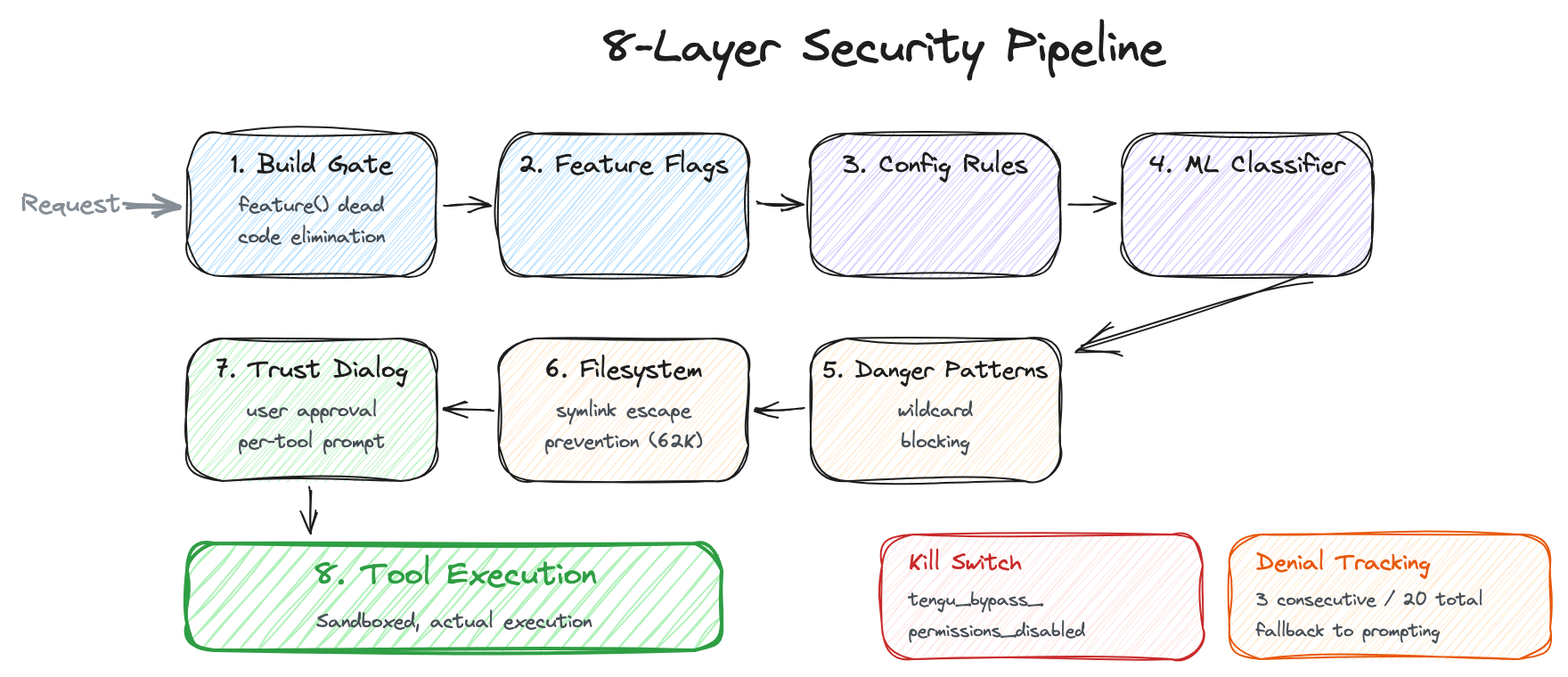
"An AI agent accessing my filesystem and executing terminal commands" — a sentence sufficient to make any security researcher shudder. A single poorly crafted prompt could execute rm -rf /, and a malicious prompt injection could exfiltrate sensitive files. Looking at how Claude Code handles this problem reveals an onion-like multi-layered defense. Eight layers deep.
6.1 Layer 1: Build-Time Gate — Security Through Nonexistence
// tools.ts:117-119
const WebBrowserTool = feature('WEB_BROWSER_TOOL')
  ? require('./tools/WebBrowserTool/WebBrowserTool.js').WebBrowserTool
  : null
The feature() function is evaluated at build time. A typical if (config.enabled) branch is checked at runtime, so the code in the false branch still exists in the binary — someone could manipulate environment variables to activate it. In contrast, feature() causes the Bun bundler to completely eliminate the require() in false branches at build time. Anthropic's internal-only tool code physically does not exist in external builds. Activating them at runtime by changing environment variables is impossible — the code simply is not in the binary.
A clever approach to splitting "internal" and "external" builds from the same codebase while eliminating the security risk of runtime manipulation at its root. Of course, what leaked this time was precisely the code that should have been eliminated at build time, left behind in source maps. Not in the binary, but in the source map — an ironic situation.
The USER_TYPE environment variable follows the same pattern:
// tools.ts:16-19
const REPLTool =
  process.env.USER_TYPE === 'ant'
    ? require('./tools/REPLTool/REPLTool.js').REPLTool
    : null
6.2 Layer 2: Feature Flags — Server-Side Kill Switches
Even after the build, features can be controlled server-side. GrowthBook-based flags with the tengu_ prefix serve this role. (tengu is presumably Claude Code's internal project codename at Anthropic.)
| Flag | Role |
|---|---|
tengu_amber_quartz_disabled |
Voice mode kill switch |
tengu_bypass_permissions_disabled |
Bypass permissions mode kill switch |
tengu_auto_mode_config.enabled |
Auto mode circuit breaker |
tengu_ccr_bridge |
Remote control eligibility check |
tengu_sessions_elevated_auth_enforcement |
Requires trusted device token |
If a security incident occurs, the kill switch can be pulled from the server instantly. Being able to disable features without a client update is critically important from an incident response perspective.
Internally at Anthropic, these can be overridden via environment variable:
// CLAUDE_INTERNAL_FC_OVERRIDES (Ant-only)
// '{"my_feature": true, "my_config": {"key": "val"}}'
6.3 Layer 3: Configuration-Based Rules — Priority Across 8 Sources
type PermissionRule = {
  source: PermissionRuleSource  // One of 8 sources
  ruleBehavior: 'allow' | 'deny' | 'ask'
  ruleValue: {
    toolName: string     // "Bash", "FileEdit", etc.
    ruleContent?: string // Pattern, e.g. "python:*"
  }
}
Since conflicting rules for the same tool can come from multiple sources, a priority system is needed. Lower numbers mean higher priority — later-applied rules override earlier ones.
userSettings—~/.claude/settings.json(user global settings, highest priority)projectSettings—.claude/settings.json(per-project settings, shared with the team)localSettings—.claude/local.json(local only, not committed to git)flagSettings— GrowthBook feature flags (server-side control)policySettings— Organization-level policies (set by enterprise admins)cliArg— Command-line arguments (--allowedTools, etc.)command— Runtime rule updates (/allowduring conversation, etc.)session— In-memory session-only rules (disappear on restart, lowest priority)
User settings having the highest priority means that users have stronger control than organization policies (policySettings) or server feature flags (flagSettings). However, Layer 5 (dangerous pattern detection) and Layer 8 (kill switch), discussed later, can override this rule system.
6.4 Layer 4: Transcript Classifier — AI Watching AI
yoloClassifier.ts — a 52K file. (The file is named "YOLO" yet weighs in at 52K — Anthropic engineers clearly have a sense of humor.)
This layer operates in auto mode (auto). Auto mode is where Claude makes its own judgment and executes tools instead of asking the user "is this okay?" every time. Convenient but risky — a wrong judgment could delete files or execute dangerous commands. To mitigate this risk, an additional Claude API call separately judges the safety of each tool usage.
1. Tool usage request occurs
2. Whitelist check
   └ FileRead, Grep, Glob, Tasks, etc. (read-only) → skip classifier, auto-allow
     (reading files is not dangerous, so skip the API call to avoid waste)
3. Classifier API call → "allow" or "deny"
4. Denial tracking:
   └ 3 consecutive denials → fall back to prompting mode
   └ 20 total denials → fall back to prompting mode
The fallback mechanism in denial tracking is important. If the classifier acts too conservatively, it keeps denying even safe operations, rendering the tool unusable. After 3 consecutive or 20 cumulative denials, it automatically switches to prompting mode — "better to just ask the user directly."
Tip: Setting the
CLAUDE_CODE_DUMP_AUTO_MODE=1environment variable dumps the classifier's requests/responses as JSON to/tmp/claude-code/auto-mode/. Useful when debugging why auto mode is rejecting certain operations.
What if the classifier API call itself fails (network error, timeout, etc.)? It falls back to prompting — not automatic denial. This is a fail-open strategy. When a security system encounters a failure, there are two choices: fail-closed (block everything) or fail-open (let it through). Fail-open is typically dangerous in security, but here "letting it through" means "let the user decide," not "execute unconditionally" — which makes it a reasonable choice.
6.5 Layer 5: Dangerous Pattern Detection
Even if a tool passes Layer 3's configuration rules and Layer 4's classifier, certain patterns are blocked via hardcoded detection.
DANGEROUS_BASH_PATTERNS = [
  // Interpreters: programming language runtimes capable of arbitrary code execution
  'python', 'node', 'ruby', 'perl', 'bash', 'sh', 'zsh', 'ksh',
  // Code execution: commands that interpret strings as code
  'exec', 'eval', 'source',
  // Network: tools that can exfiltrate data or download malicious code
  'curl', 'wget', 'nc', 'ncat', 'socat',
  // Binary/crypto: tools that can obfuscate malicious activity via data transformation or encryption
  'dd', 'xxd', 'openssl',
  // Remote access: tools that can infiltrate other systems
  'ssh', 'scp', 'sftp',
  // Privilege escalation: commands that can obtain admin privileges or escape isolation
  'sudo', 'su', 'chroot', 'unshare', 'docker', 'podman',
  // Filesystem permissions: commands that can bypass file protections
  'chmod', 'chown', 'chgrp', 'umask', 'mount', 'umount'
]
In auto mode, attempts to set python:* or interpreter wildcards as allow rules are blocked.
isDangerousBashPermission(rule) {
  // Tool-level allow without content (allow all bash) → dangerous
  // "python:*", "python*", "python -*" → dangerous
  // Interpreter prefix + wildcard → dangerous
}
Why are interpreters especially dangerous? If BashTool can execute python, then within Python, any system command can be run. Something like python -c "import os; os.system('rm -rf /')" can bypass all Bash-level security checks, which is why interpreter execution itself is blocked at the source.
6.6 Layer 6: Filesystem Permission Validation (62K)
The largest permission file (62K) is dedicated solely to file path validation. When Claude says "I'll modify this file," it verifies that the path is actually a place it should be allowed to access.
- Absolute path normalization: Resolves relative paths like
./src/../config.jsonto/home/user/project/config.jsonto determine "where it actually points" - Symlink escape prevention: If someone creates a symlink inside the project folder pointing to
/etc/passwd, Claude could access system files through the link. This validation checks the symlink's real target path to block such escapes - Safe glob pattern expansion: Limits expansion range so patterns like
/**/*do not inadvertently include paths outside the project - CWD-only mode vs. full access mode: In
acceptEditsmode, only the current working directory is modifiable - Scratchpad support: Allows Coordinator workers (Section 7.3) to access shared directories (
tengu_scratch) - Windows/POSIX path handling: Cross-platform support for both
C:\Users\...and/home/...
6.7 Layer 7: Trust Dialog
When you first run Claude Code in a new project, a security dialog appears. If the project's .claude/ directory contains settings, the dialog shows the user what those settings allow and obtains explicit consent.
- Project-scoped MCP server configurations (external tool connections)
- Custom Hook configurations (user-defined shell command execution)
- Bash permission settings (which commands are auto-allowed)
- API key helpers (authentication credential access)
- AWS/GCP command access (cloud resource control)
- OTEL headers (telemetry data transmission)
This layer exists to prevent attacks via malicious project configurations. If someone puts "allowedTools": ["Bash:rm -rf /"] in .claude/settings.json and pushes it to GitHub, any user who clones that repository and runs Claude Code could have dangerous commands auto-allowed. The Trust Dialog intercepts this before it happens.
6.8 Layer 8: Bypass Permissions Kill Switch
Bypass mode is the "ultimate convenience" mode that skips all permission checks. Useful during development when you want Claude to stop asking "is this okay?" every time, but if abused, all security layers are neutralized. This kill switch activates when tengu_bypass_permissions_disabled is enabled on the GrowthBook server:
// bypassPermissionsKillswitch.ts
// Blocks users from entering bypass mode entirely
// Forces users already in bypass mode back to their previous mode
// Displays diagnostic message
When a security incident occurs and Anthropic flips this flag on the server, bypass mode is instantly disabled across every Claude Code client worldwide. No client update required, so response time is effectively zero.
Insight: Security Model Design Philosophy
A consistent set of principles runs through all 8 layers:
- Deny by default — Without an explicit allow rule, access is denied. When a new tool is added, it starts in a blocked state
- Fail to prompting, not to deny — When the system cannot make a judgment, it asks the user rather than automatically denying. Maintains the safety net without harming UX
- Defense in depth — Even if Layer 1 (build-time) is breached, Layer 4 (classifier) catches it; even if the classifier is breached, Layer 5 (pattern detection) catches it. No single point of failure
- Server-side kill switch — When a security incident occurs, features can be instantly disabled from the server without client updates
- Build-time elimination — If the code does not exist in the binary, neither does the vulnerability. The most fundamental form of security
7. Unreleased Features: The Roadmap Got Leaked
Unreleased features hiding behind feature flags were exposed. This is the area that became the most "unintended gift" to competitors.
7.1 Voice Mode — Coding by Voice
// voice/voiceModeEnabled.ts
export function isVoiceModeEnabled(): boolean {
  return hasVoiceAuth() && isVoiceGrowthBookEnabled()
}

export function hasVoiceAuth(): boolean {
  // OAuth only (requires Claude.ai account)
  // Not available via API key/Bedrock/Vertex
  // Uses voice_stream endpoint
}

export function isVoiceGrowthBookEnabled(): boolean {
  return feature('VOICE_MODE')
    ? !getFeatureValue_CACHED_MAY_BE_STALE('tengu_amber_quartz_disabled', false)
    : false
}
Several things can be gleaned:
- A dedicated
voice_streamAPI endpoint exists, separate from the standard Messages API. - It is OAuth-only. Users on API keys or third-party clouds (Bedrock/Vertex) cannot access it.
- A GrowthBook kill switch (
tengu_amber_quartz_disabled) allows instant server-side deactivation. - The caching strategy uses
_CACHED_MAY_BE_STALE, meaning it uses a cached flag value rather than real-time checks. Voice mode activation status is not queried from the server on every call.
7.2 Web Browser Tool — Real Browser Automation
const WebBrowserTool = feature('WEB_BROWSER_TOOL')
  ? require('./tools/WebBrowserTool/WebBrowserTool.js').WebBrowserTool
  : null
The current WebFetchTool only fetches static HTML — it cannot see the content of SPA (Single Page Application) pages that are rendered by JavaScript. WebBrowserTool is presumably real browser automation leveraging Bun's WebView API, enabling interaction with pages that require JavaScript rendering. Think of it as a terminal-specialized version of Anthropic's Computer Use (the feature that sees desktop screens and operates mouse/keyboard).
7.3 Coordinator Mode — Multi-Agent Orchestration (19K)
The most ambitious unreleased feature.
// coordinator/coordinatorMode.ts
export function isCoordinatorMode(): boolean {
  if (feature('COORDINATOR_MODE')) {
    return isEnvTruthy(process.env.CLAUDE_CODE_COORDINATOR_MODE)
  }
  return false
}
The Coordinator does not write code directly. It is a meta-orchestrator that spawns multiple worker agents and distributes tasks.
- Workers are spawned via
AgentTool - Results arrive as
<task-notification>XML blocks SendMessagesends follow-up instructions to workersTaskStopterminates workers
The allowed tools are strictly limited:
COORDINATOR_MODE_ALLOWED_TOOLS = new Set([
  'AgentTool',           // Spawn worker
  'TaskStop',            // Terminate worker
  'SendMessage',         // Communicate with worker
  'SyntheticOutput',     // Combine worker results into final output for the user
])
The Coordinator cannot execute Bash. It cannot read files. It can only manage workers. This is an extreme application of the principle of least privilege — if the orchestrator could execute tools directly, it would become a single point of failure.
Shared scratchpad (tengu_scratch GrowthBook gate):
A directory for information sharing between workers. It bypasses normal filesystem permission checks — workers need to access the scratchpad outside their CWD.
This is effectively a microservices architecture for AI agents. Just as an API gateway in microservices does not execute business logic directly but distributes requests to services, the Coordinator does not write code directly but distributes tasks to workers. Each worker operates independently in an isolated context and returns only results to the Coordinator.
7.4 Kairos — The Proactive Assistant
Kairos, Greek for "the opportune moment," is a mode where Claude acts first.
| Feature Flag | Tool | Capability |
|---|---|---|
KAIROS |
SendUserFileTool |
Proactively sends files to the user |
KAIROS || KAIROS_PUSH_NOTIFICATION |
PushNotificationTool |
Mobile/desktop push notifications |
KAIROS_GITHUB_WEBHOOKS |
SubscribePRTool |
GitHub PR webhook subscriptions |
PROACTIVE || KAIROS |
SleepTool |
Background waiting (timer) |
KAIROS_CHANNELS |
(unknown) | Multi-channel integration |
KAIROS_BRIEF |
(unknown) | Checkpoints/status updates |
Picture this scenario: A new review comment is posted on a GitHub PR. SubscribePRTool detects it, checks the CI results, and sends a notification via PushNotificationTool: "PR #123 got a review, and CI failed. Here's what you might want to fix." SleepTool periodically wakes to check status.
Claude works even when the user has not opened a session. This represents a transition beyond coding assistant to autonomous software engineering agent.
7.5 Agent Triggers & Monitoring
const cronTools = feature('AGENT_TRIGGERS')
  ? [CronCreateTool, CronDeleteTool, CronListTool]
  : []

const RemoteTriggerTool = feature('AGENT_TRIGGERS_REMOTE')
  ? require('./tools/RemoteTriggerTool/RemoteTriggerTool.js').RemoteTriggerTool
  : null

const MonitorTool = feature('MONITOR_TOOL')
  ? require('./tools/MonitorTool/MonitorTool.js').MonitorTool
  : null
"Teammate" is presumably Anthropic's internal term for a long-running agent instance. Crons created by a teammate are tagged with that agent's agentId and routed to that agent's message queue. This means long-running agents can manage their own schedules — autonomous recurring tasks like "check CI status every morning at 9 AM" become possible.
7.6 UDS Inbox — Multi-Device Messaging
const ListPeersTool = feature('UDS_INBOX')
  ? require('./tools/ListPeersTool/ListPeersTool.js').ListPeersTool
  : null
"UDS" presumably stands for Unified Device Stack. Agents can query "peers" — other devices or Claude Code instances connected to the same user account — and route messages via bridge:// (through the Bridge system) or other:// (direct communication) schemas.
Picture a world where the Claude Code on your laptop says "ask the Claude Code on my desktop to run these tests." It may still be distant, but the communication pipes are already laid.
7.7 Workflow Scripts
const WorkflowTool = feature('WORKFLOW_SCRIPTS')
  ? (() => {
      require('./tools/WorkflowTool/bundled/index.js').initBundledWorkflows()
      return require('./tools/WorkflowTool/WorkflowTool.js').WorkflowTool
    })()
  : null
There are bundled workflows (pre-built automation scripts) with an initialization system. Recursive execution is blocked inside sub-agents (included in ALL_AGENT_DISALLOWED_TOOLS) — a safety measure to prevent infinite recursion where a workflow calls another workflow, which calls yet another workflow.
7.8 Bridge — Remote Control System (33+ Files)
The Bridge system is a large subsystem comprising 33+ files. It is the backend for the "Remote Control" feature that controls the local machine's Claude Code from the Claude.ai web interface.
Connection Flow
1. User → OAuth login to claude.ai
2. CCR (Claude Cloud Runtime) API → Subscription + GrowthBook gate check (tengu_ccr_bridge)
3. Local Claude Code → Obtains environment_id + environment_secret
4. Authenticated tunnel setup (WebSocket)
5. Browser → Bridge API → Local tool execution → Result return
Security Tiers
| Tier | Authentication Requirements | Use Case |
|---|---|---|
| Standard | OAuth token | Regular remote sessions |
| Elevated | OAuth + Trusted Device Token (JWT) | Sessions involving sensitive operations |
In the Elevated tier, device trustworthiness is additionally verified via the X-Trusted-Device-Token header.
// bridge/trustedDevice.ts
// JWT bound to a physical device
// Guarantees "this request actually came from a registered device"
Session Isolation
Each remote session is isolated via Git worktree. Even if you connect to the same project from two browser tabs, each runs in an independent working directory. An approach that eliminates merge conflicts between sessions at the source.
Session lifecycle is managed by sessionRunner.ts, maintaining session handoff security with JWT-signed WorkSecret.
Insight: Design Lessons from Remote Control
The noteworthy aspect of the Bridge system is its session isolation strategy. Using Git worktree as the session isolation unit is a pragmatic choice that leverages existing infrastructure (Git) to achieve filesystem-level isolation. It has lower overhead than container or VM-level isolation while still giving each session its own independent working directory.
The 2-tier authentication structure (Standard/Elevated) is also instructive. Requiring maximum authentication for all remote operations degrades user experience; requiring only the minimum weakens security. Varying the authentication level based on operation sensitivity is a realistic approach to balancing security and convenience.
Insight: What Unreleased Features Reveal About Direction
Synthesizing these features reveals Anthropic's strategy:
- CLI → Platform: From a single terminal tool to a multi-device, multi-agent platform
- Reactive → Proactive: From awaiting user commands to autonomous monitoring and notifications
- Text → Multimodal: From typing to voice and browser automation
- Single → Orchestration: From one agent to an agent swarm managed by a Coordinator
8. Conclusion: What the Leak Tells Us
Claude Code's internals, revealed through the absurd channel of an npm source map, turned out to be not a simple API wrapper but a full-stack agent platform spanning 4,600 files. "Call the LLM API and execute tools — done" is a demo-level understanding. Production demands 4-tier compaction layers, cache edit block pinning, cost-aware error recovery, 8-layer security, and streaming parallel tool execution. Competing products like OpenAI's Codex, Cursor, and Devin likely harbor similar levels of complexity internally. Their code simply has never been made public.
If there is one principle running through this architecture, it is cost-awareness. Error recovery starts with free options first. Compaction starts with methods that require no API calls. Tool search loads only when needed. In a system where every API call is a cost, "cheapest method first" is not elegance — it is survival.
The unreleased features reveal Anthropic's direction: voice mode, web browser automation, multi-agent Coordinator, proactive Kairos mode. The transition from "coding assistant" to "autonomous software engineering platform" is already underway at the code level.
And a question lingers about "open source." The official repository contains only the plugin interface (279 files), while the core engine (4,600+ files) sits behind a commercial license. This is not solely Anthropic's issue. Many AI products publish only extension interfaces under the "open" label while keeping the core proprietary.
There is irony here. They implemented a sophisticated security mechanism for build-time dead code elimination, then forgot to strip source maps from that same build pipeline. They built 8 layers of onion-like protection around users' filesystems, while uploading their own source code to npm.
Perhaps this is the essence of software engineering. Even the most sophisticated systems fall to the simplest mistakes. What Anthropic's engineers built is undeniably an impressive agentic architecture. Just next time, hopefully they will remember to add *.map to their .npmignore.
This post is a technical analysis of leaked source code and does not encourage redistribution or use of the code. All code copyrights belong to Anthropic PBC.
Subscribe via RSS